Your laptop might be powerful, but the right accessories can transform how you work, play, and create. Whether you’re grinding through spreadsheets, editing videos, or gaming during your lunch break, the peripherals you choose directly impact your productivity and comfort.
Many people invest thousands in a high-end machine but overlook the gear that can shape their daily experience. The truth is, essential accessories to improve your laptop setup don’t have to break the bank, and they deliver immediate, noticeable improvements to everything you do on your computer.

This guide focuses exclusively on technology-driven accessories that enhance performance, connectivity, and usability. You won’t find generic furniture recommendations here. Only the gear that genuinely changes how your laptop functions in the real world.
Mechanical Keyboards for Superior Typing Experience
Laptop keyboards sacrifice typing quality for portability, but an external mechanical keyboard provides satisfaction with every keystroke. Mechanical switches provide tactile feedback that membrane keyboards can’t replicate, with distinct activation points that reduce typing errors and increase speed.
Cherry MX switches remain the gold standard and are available in various types. Blues for tactile clicks, Browns for quieter operation, and Reds for smooth linear action. Hot-swappable keyboards let you change switches without soldering, so you can experiment until you find your perfect feel.
RGB backlighting isn’t just aesthetic; customizable lighting helps you locate keys in dim environments and can highlight specific shortcuts for different applications. Programmable macro keys automate repetitive tasks with single keystrokes, saving hours over weeks and months.
Wireless mechanical keyboards with low-latency connections offer freedom of placement without sacrificing responsiveness. Quality keycaps made from double-shot PBT plastic resist shine and wear far longer than cheap ABS alternatives. The typing experience improves immediately, and your wrists will thank you for the better ergonomics that full-sized keyboards provide compared to cramped laptop layouts.
High-Precision Mice for Accurate Navigation
Trackpads work fine for basic tasks, but precision work demands a dedicated mouse with proper sensors and ergonomic design. Modern gaming mice feature sensors with adjustable DPI settings ranging from 400 for pixel-perfect precision to 16,000 or higher for rapid movements across multiple monitors.
Optical sensors have surpassed laser technology in accuracy, tracking smoothly across various surfaces without acceleration issues. Programmable buttons let you assign commonly used functions to thumb controls, eliminating the need to navigate menus and toolbars.
Ergonomic shapes reduce strain during extended use, with options for palm, claw, and fingertip grips depending on your natural hand position. Wireless mice have evolved beyond early battery-hungry models. Current-generation devices last for months on a single charge while maintaining lag-free connections.
For creative professionals, mice with infinite scroll wheels enable rapid document navigation, while stepped scrolling provides precise control when needed. The difference between fighting with a trackpad and flowing through work with a quality mouse becomes evident within minutes of switching.
External Monitors for Expanded Screen Real Estate
Working on a single laptop screen feels cramped after you’ve experienced the freedom of a dual- or triple-monitor setup. External displays give you room to spread out applications, compare documents side by side, and keep reference materials visible while you work on primary tasks.
Modern monitors offer features that laptop screens can’t match, including higher refresh rates for smoother motion, better color accuracy for creative work, and larger sizes that reduce eye strain during marathon sessions. A 27-inch 4K display offers four times the pixel density of standard HD, resulting in sharper text and more detailed images.
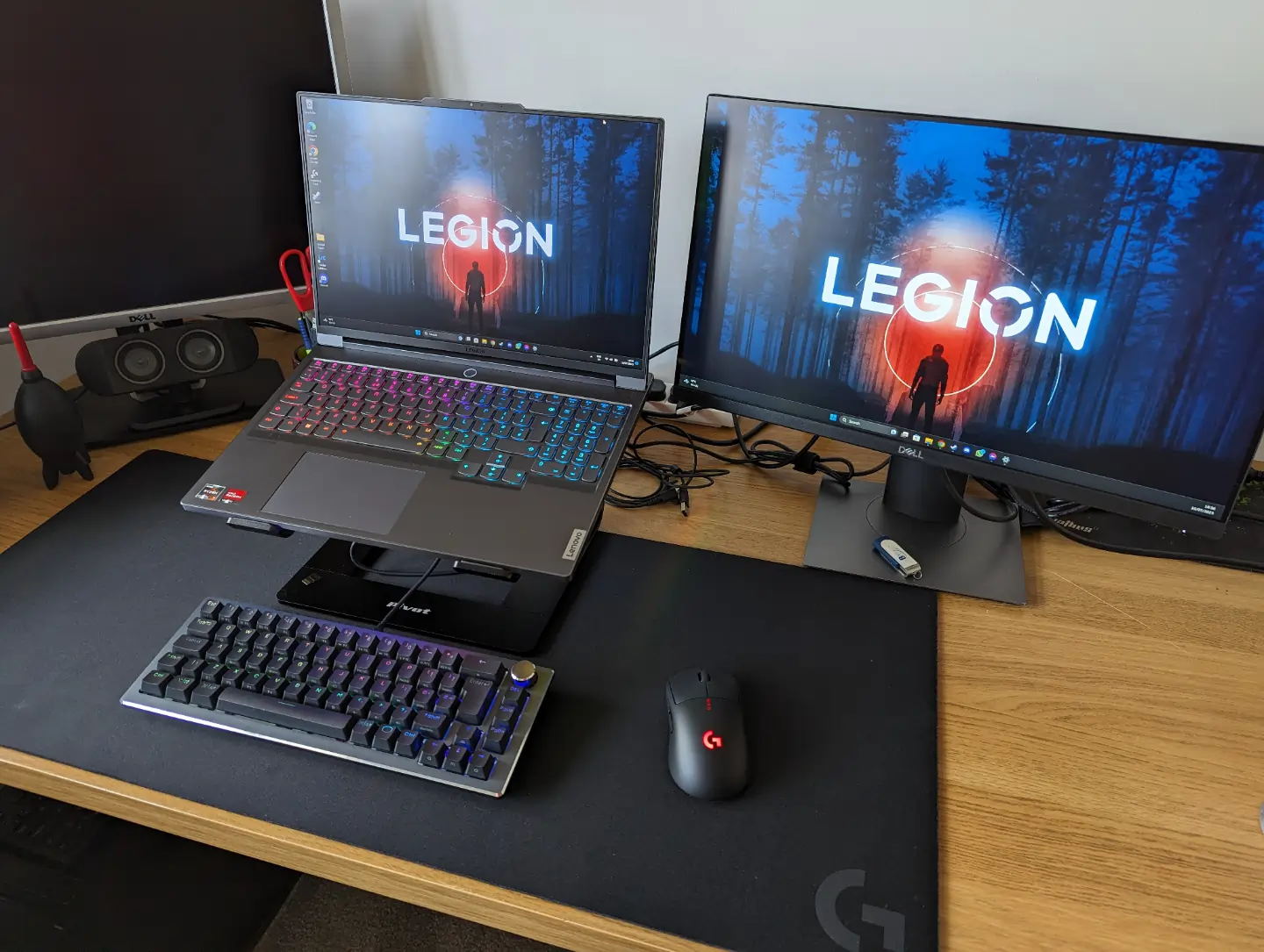
Gamers benefit from high-refresh-rate panels running at 144Hz or higher, eliminating motion blur and giving them a competitive advantage in fast-paced titles. Creative professionals should look for monitors with wide color gamuts covering 99% of sRGB or Adobe RGB for accurate color reproduction.
USB-C monitors with power delivery can charge your laptop with the same cable that transmits video, significantly reducing desk clutter. The investment pays dividends immediately. You’ll wonder how you ever managed with just your built-in display.
USB Hubs and Docking Stations for Connectivity
Modern laptops sacrifice ports for thinness, leaving users constantly swapping cables and adapters. A quality USB hub or docking station solves this frustration permanently, transforming a single connection into comprehensive connectivity.
Thunderbolt 4 docks provide blazing 40Gbps bandwidth, enough to drive multiple 4K displays, charge your laptop at full speed, and transfer files simultaneously without bottlenecks. Look for hubs with a variety of port types. USB-A for legacy devices, USB-C for modern peripherals, HDMI or DisplayPort for monitors, and Ethernet for a stable wired internet connection.
Power delivery matters tremendously; a dock with 100W charging handles power-hungry gaming laptops while supplying juice to connected devices. SD card readers built into docks save photographers and videographers from having to carry separate adapters.
Some docks include audio jacks with DACs that deliver better sound quality than laptop headphone outputs. Cable management features help extend the lifespan of charging cables by preventing stress at connection points and organizing wires neatly. Investing in a proper dock means you connect everything once, then plug your laptop into a single cable when you sit down.
External SSDs for Fast, Portable Storage
Cloud storage works until you need speed, privacy, or must work offline. That’s when external SSDs become essential. Modern portable SSDs deliver read speeds exceeding 1,000 MB/s, transferring a 50GB video project in under a minute, compared to the glacial pace of traditional hard drives.
NVMe SSDs in USB 3.2 Gen 2×2 enclosures deliver speeds of 2,000 MB/s and beyond, approaching internal drive performance in a pocket-sized package. Rugged models with shock resistance and water protection safeguard irreplaceable files from accidents that would destroy fragile spinning drives.
Encrypted SSDs protect sensitive work with hardware-level AES 256-bit encryption, ensuring data remains secure even if the drive falls into the wrong hands. Thunderbolt SSDs achieve even higher speeds for professionals moving massive RAW photo libraries or 8K video footage. Capacities range from 500GB to 8TB, providing ample space for backup archives, media libraries, and project files.
Unlike cloud subscriptions that charge monthly fees forever, external storage is a one-time investment you control entirely. The reliability and speed of solid-state technology mean you’ll actually use your backup drive, rather than letting critical files exist in just one location.
Building Your Perfect Setup
Upgrading your workspace with the right technology accessories creates a laptop experience that rivals or even exceeds that of traditional desktop setups. Essential accessories to improve your laptop setup address specific pain points, including insufficient screen space, mediocre input devices, limited connectivity, and slow storage.
The beauty of this approach lies in flexibility; you can start with one or two upgrades that address your biggest frustrations, then expand over time as needs and budgets allow. Each accessory brings immediate, tangible benefits to your daily computing experience.
These aren’t frivolous purchases; they’re investments in productivity, comfort, and the longevity of your existing laptop. Rather than replacing your computer every few years when it feels slow or limiting, the right peripherals breathe new life into machines that still have plenty of processing power. Choose wisely based on your specific needs, and you’ll create a setup that enhances how you work and play rather than simply looking impressive on your desk.