If you’re searching for how to play Valorant Mobile right now, the key thing to know is this: the game is currently region-limited, so getting in from outside the supported region usually takes a few extra steps. On top of installing the app, you’ll typically need a verified WeChat or QQ login, and many players also rely on a VPN for stable access. Like many players who explore competitive services such as Valorant Elo Boosters, mobile users often look for ways to access content that is not yet widely available in their region.
This guide walks you through Android and iOS download methods, then covers what to do after installation so you can actually get into matches without constant errors.
How to Play Valorant Mobile
Playing is easy once you overcome these two major hurdles – getting past the account login stage and ensuring you are properly connected.
Here is the checklist you need to run through before starting your game session:
- Make sure that there is enough space left on your device for download – at least 4 GB.
- Get a verified WeChat/QQ account, as the login with Riot ID might be unavailable currently.
- Have a stable connection via a Virtual Private Network (VPN), if necessary.
What You Need Before You Launch
Typically, failed launch problems boil down to any one of these causes:
- Problems with resource download and reset: normally solved by switching Internet connections or activating the VPN.
- Blocked login: generally due to WeChat or QQ not being authenticated.
- Kicks during matches: generally caused by unstable routing, which is why some gamers keep the VPN open throughout the game.
Logging in With WeChat or QQ
When you open the game, you’ll typically be prompted to sign in with WeChat or QQ.
If your account isn’t verified, you may hit a wall. Verification can be quick (SMS) or stricter depending on your region and the platform’s checks. If you can’t complete it, you may need help from someone who already has a verified account in your country or region.
Using a VPN Without Making Your Ping Worse
The use of a Virtual Private Network (VPN) will assist in connecting to the game, though the connection might be delayed depending on which server you choose.
A basic solution:
- First, connect to the server nearest to the region where the game can be accessed.
- Should you be kicked out, try another location within proximity and not some continent away.
- Once connected, stick to that path for the entire session.
How to Download Valorant Mobile on Android

Android installs usually happen outside Google Play, so you’ll be using a third-party source.
Method 1: Install via the 3839 Popcorn App
This is one of the most commonly used options for the current build.
Steps Involved:
- Get the 3839 Popcorn application on your phone through a reliable source.
- Run the program and find Valorant Mobile.
- Hit the green ‘Download’ option.
- If an alert message comes up regarding installing applications from unknown sources, then click to install it.
- Finally, run the game and allow it to download resources.
Tip: Don’t start the download when you’re low on storage. The base install is only part of it, and the resource pack is where many phones run out of space.
Method 2: Download via WeChat Link
Some users can reach the official or semi-official download page via the built-in browser of the WeChat app.
Process:
- Download WeChat and register.
- Verify.
- Use the in-built WeChat browser to access the download link.
- Download and install the APK.
- Run the game and download the resources.
If the APK fails to install, double-check that your Android version and device security settings allow that install source.
How to Download Valorant Mobile on iOS
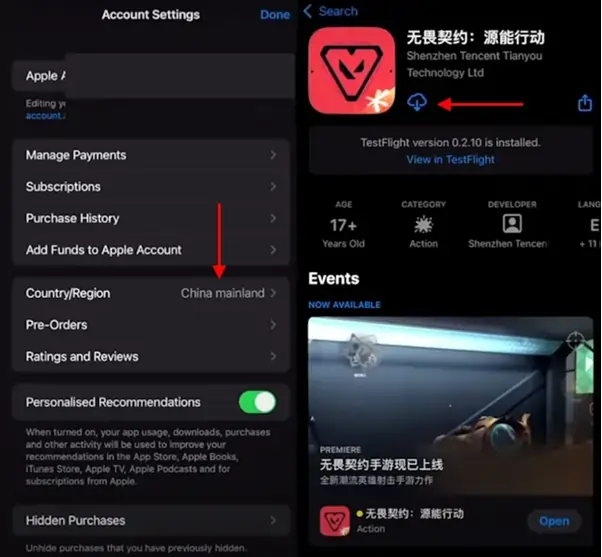
On iPhone, the most common workaround is changing your App Store region so the game appears for download.
Change Your App Store Region
Steps most players follow:
- Open the App Store and tap your profile icon.
- Go to Country/Region.
- Switch to China mainland (or the region where the game is currently available).
- Enter the required details, which may include an address.
- Refresh the App Store, search for Valorant Mobile, and download.
Consider Using a Second Apple ID
Switching regions on your main Apple ID can be annoying if you have subscriptions or payment methods tied to it.
A common workaround is creating a separate Apple ID dedicated to region-specific downloads. Since the game is free, you often won’t need to add a payment method just to install it.
Valorant Mobile After Installation
Installing the app is only half the job. The first launch is where most players run into friction.
Finish the In-Game Resource Download
A big download is expected when you open the application. In case the download fails or stops:
- Change from using mobile internet to Wi-Fi, or vice versa.
- Turn on the VPN if you are in an unsupported area.
- Do not close the application during the download process because many phones shut down background processes.
Fix Common Login and Access Problems
If you cannot navigate beyond the login screen:
- Make sure that the account on WeChat or QQ has been successfully verified.
- Make sure that you have the VPN enabled right at the outset, and not only once you see an error message.
- If there are disconnections in the line, try another server for the VPN.
Make the Game Run Smoother on Your Phone
The performance of the mobile version is very important in this type of game.
Winning tips:
- Close background applications before playing.
- Reduce graphic details if you notice any lag when fighting.
- Take a break or cool down your phone if you feel that it gets hot fast.
Conclusion and Future of Valorant Mobile
It may require a little patience getting in early, but once you have done everything from installation to logging through WeChat or QQ, and setting up a stable internet connection, you will be ready to learn about agents, maps, and mobile controls before the game is made available to everyone.
Should you choose to try out how to play Valorant mobile early, then think of it more as an early set-up phase than an easy one-touch installation.